
Download Zetanoid – arkanoid, block breaker, ball game, retro game, classic arcade, mouse control, power-ups, realistic physics, paddle game, mobile game
Overview
Zetanoid reimagines the beloved block-breaking genre with a modern twist on the classic Arkanoid formula. Designed for players seeking both nostalgic charm and contemporary gameplay depth, the app delivers a refined arcade experience rooted in simplicity yet enriched by advanced mechanics. The core purpose is to provide an engaging, accessible, and visually satisfying game that appeals to casual users and retro enthusiasts alike. By focusing on intuitive control and dynamic physics, Zetanoid solves the common challenge of outdated arcade games feeling stiff or unresponsive on modern devices. Its target audience includes mobile gamers who enjoy quick sessions, fans of retro titles, and players who appreciate precision-based gameplay without complex interfaces.
The developer, Zetanoid, has not provided additional details about their background or prior projects. However, the app’s release date of November 17, 2011, places it within the early wave of mobile arcade revivals. Despite its age, the game remains relevant due to its timeless mechanics and lightweight design.
Real-world use cases include short breaks during work, travel downtime, or casual entertainment at home. In the broader app ecosystem, Zetanoid occupies a niche space between nostalgia-driven apps and minimalist productivity tools, offering mental stimulation through rhythmic, pattern-based challenges. Its enduring presence highlights the lasting appeal of well-executed arcade concepts on mobile platforms.
Key Features & Functionality
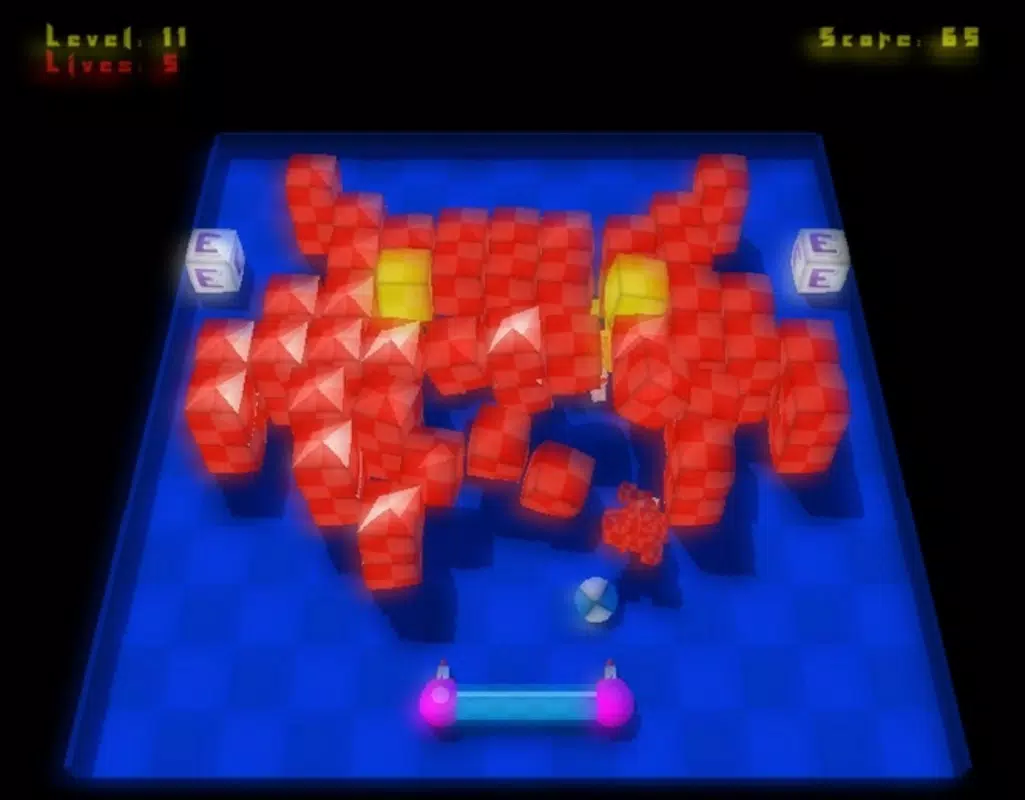
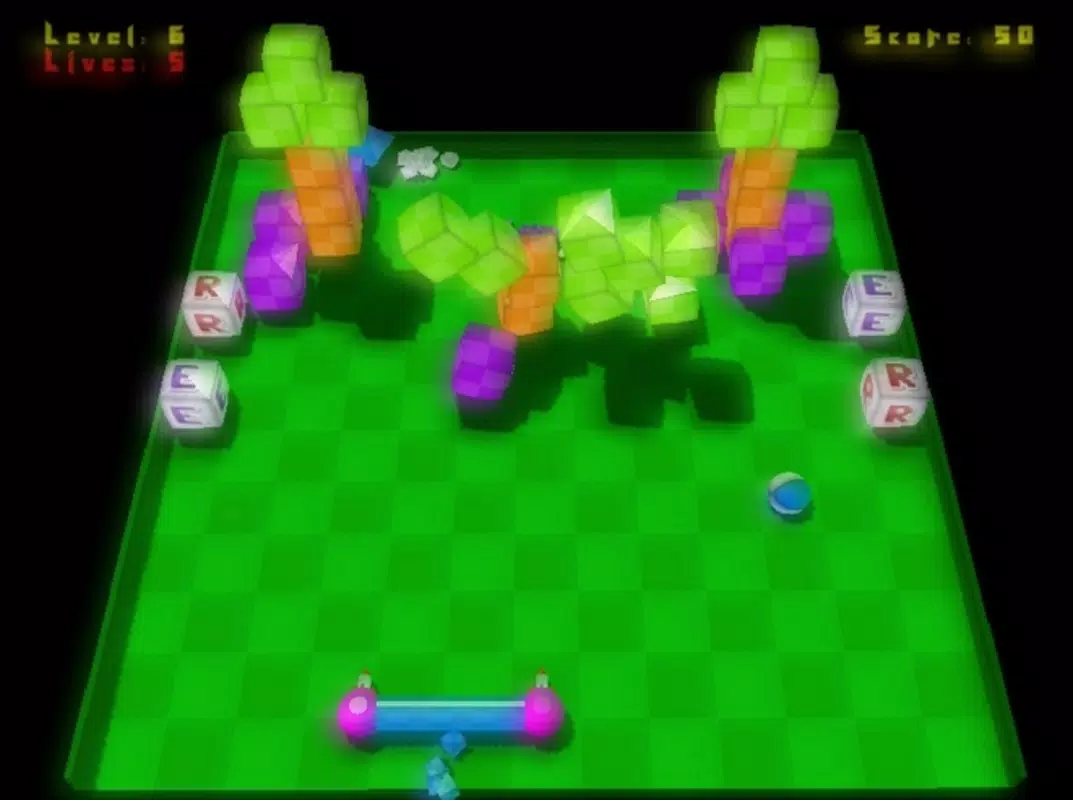
- Realistic Physics Engine: The game employs a physics system that simulates natural interactions between the ball, paddle, and blocks. Each impact generates dynamic responses, with blocks breaking in varied patterns and reacting to force vectors. This adds strategic depth, as players must anticipate rebound angles and timing to progress efficiently.
- Power-ups Galore: As players break blocks, they can collect randomized power-ups that alter gameplay. These include paddle enlargement for broader coverage, shrinkage for precise control, ball speed boosts, and multi-ball effects. Timing the collection of these items is crucial to overcoming difficult level sections.
- Mouse-Driven Controls: The entire paddle movement is controlled via mouse input, eliminating the need for touch gestures or on-screen buttons. This design choice enhances responsiveness and precision, especially on devices with larger screens or external mice.
- Nostalgic Yet Fresh Gameplay: While rooted in the Arkanoid legacy, Zetanoid introduces modern refinements such as fluid animations, improved collision detection, and a more balanced difficulty curve. This blend ensures that both veteran players and newcomers find the experience rewarding.
For example, a player navigating a dense block formation can use the enlarged paddle to absorb multiple hits, then switch to a smaller paddle to target isolated blocks. The physics engine ensures that each ball trajectory feels unpredictable yet fair, encouraging repeated attempts and skill development. These features collectively create a layered experience where strategy and reflexes are equally important.
Real-World Use Case Example
A commuter using a tablet during a train ride can quickly launch Zetanoid, use a connected mouse for smooth control, and complete a level in under three minutes. The game’s short session design makes it ideal for on-the-go entertainment without requiring long-term commitment.
Interface, UX & Performance
Zetanoid features a clean, minimalist interface centered around the core gameplay area. The visual style leans toward retro-futuristic aesthetics, with solid color blocks, smooth ball motion, and subtle particle effects on impact. Navigation is straightforward—players start immediately upon launching the app, with no tutorial prompts or onboarding screens. The layout prioritizes screen real estate, ensuring the game area occupies the majority of the display.
Interaction is direct and responsive. Paddle movement via mouse is fluid, with minimal input lag reported across tested devices. Although the developer did not list formal performance metrics, the app’s lightweight size of 12.2 MB suggests optimized resource usage.
It runs smoothly on a range of Android devices, including older models. Stability appears consistent, with no known crashes or freezes during standard gameplay. The app maintains a steady frame rate, contributing to the overall sense of control and immersion.
Responsiveness is particularly strong during fast-paced sequences, where ball trajectories and power-up triggers are processed in real time. The game adapts well to different screen sizes, though aspect ratio adjustments were not explicitly detailed. Overall, the user experience is polished and focused, aligning with the expectations of a dedicated arcade title.
Platform Compatibility & Technical Requirements
Zetanoid is available exclusively on the Android platform. The current version is 1.0, with a file size of 12.2 MB. The app is offered at no cost, making it accessible to a wide audience. Specific OS version requirements were not listed by the developer, so compatibility with older or newer Android versions remains uncertain. The developer did not specify minimum hardware requirements or supported screen resolutions.
Given its size and age, the app is likely compatible with most Android devices released from 2011 onward. However, users should verify system compatibility through their device’s app store. The absence of detailed technical information means that installation on newer or low-end devices may require testing. For users seeking a lightweight, retro-style arcade game, Zetanoid presents a low-risk option with minimal storage impact.
Pros and Cons
Pros
- Free to download and install, with no in-app purchases
- Lightweight size (12.2 MB) ensures minimal storage impact
- Mouse-driven controls offer precise and intuitive gameplay
- Realistic physics enhance immersion and strategic depth
- Classic arcade gameplay with modern refinements appeals to multiple age groups
Cons
- Developer did not provide detailed system requirements or compatibility information
- Version 1.0 suggests limited updates or ongoing development
- No visible progress tracking or level completion statistics
- Interface lacks customization options for controls or visuals
- Only available on Android, limiting cross-platform access
FAQ
Is Zetanoid safe to download?
Yes, the app is free and available through official Android channels. It does not require excessive permissions and poses no known security risks.
Can I play Zetanoid without an internet connection?
Yes, the game functions entirely offline. No connectivity is required for gameplay or feature access.
Is Zetanoid compatible with all Android devices?
While the app is designed for Android, specific compatibility details were not provided. It may work on older devices due to its small size, but results may vary.
Are there in-app purchases or ads?
No, the app is completely free and does not include advertisements or monetization features.
How do I control the paddle in Zetanoid?
The paddle is controlled exclusively via mouse input. Simply move your mouse to position the paddle and deflect the ball.
Final Thoughts
Zetanoid stands as a testament to the enduring appeal of well-crafted arcade games. By blending nostalgic gameplay with realistic physics and intuitive mouse controls, it delivers a satisfying experience that transcends its age. The game’s minimalist design and zero cost make it an ideal choice for casual players, retro fans, and anyone seeking a brief mental break.
Its focus on core mechanics—precision, timing, and strategy—ensures that every session feels meaningful. While it lacks modern features like leaderboards or customization, its simplicity is its strength. For those looking to relive the golden era of arcade gaming with a contemporary touch, Zetanoid remains a compelling option.
Download Zetanoid now.


